
The Weekly Sales Dashboard for Online Coaches: 12 Numbers to Track Before You Scale Ads, Setters, or AI
A practical weekly sales dashboard for online coaches tracking lead source quality, DM movement, follow-up, booked calls, no-shows, close outcomes, and the next system fix.
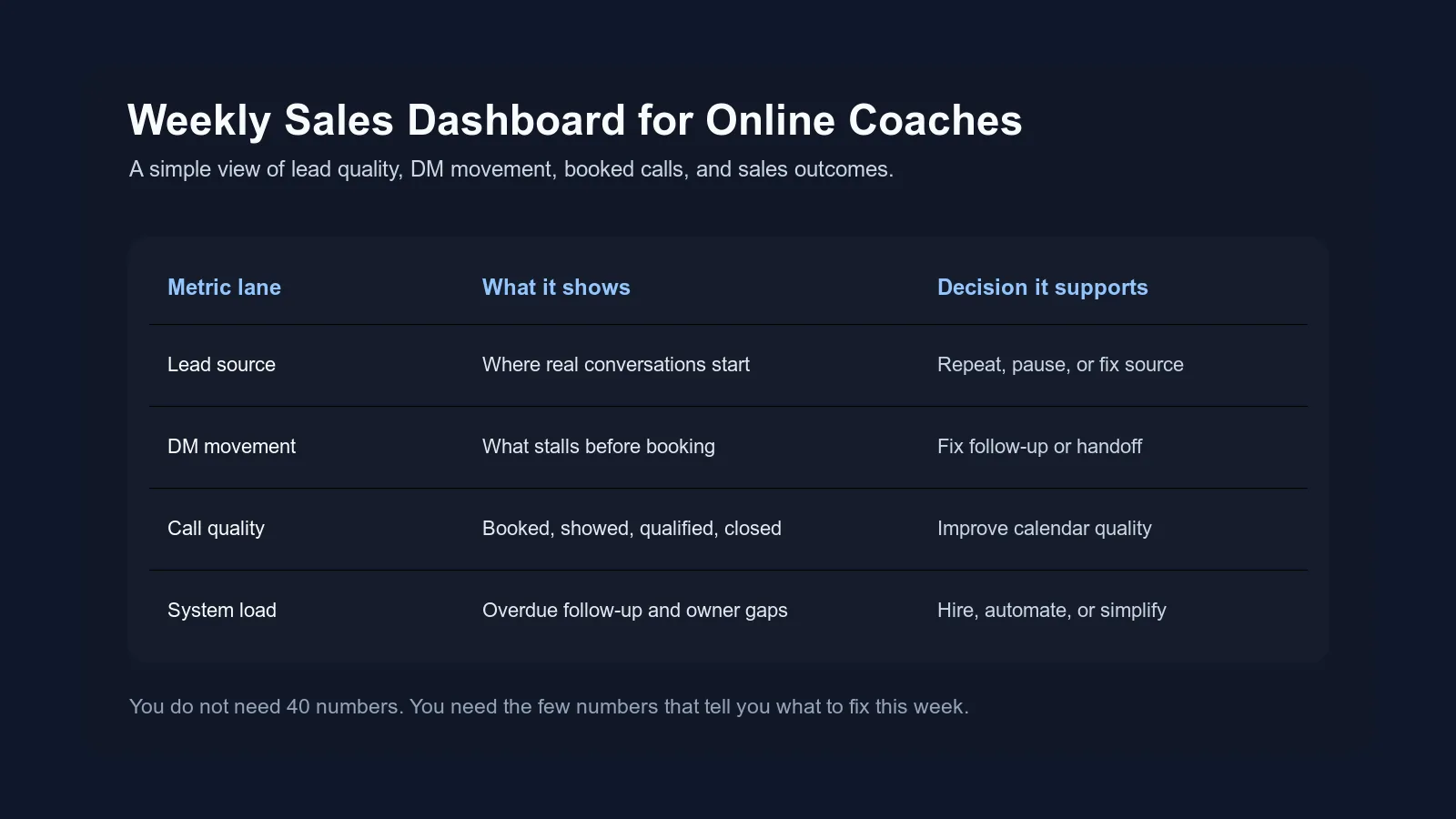
Most coaches do not need a prettier dashboard.
They need a dashboard that forces a decision.
If you already have DM volume, ads running, a setter helping, old leads coming back, and calls on the calendar, it is easy to feel busy while still not knowing where the sales system is actually leaking.
You know the feeling.
The calendar has calls, but some are weak. The inbox has leads, but some never move. Ads create conversations, but you are not sure which ones are serious. The setter says follow-up is happening, but a few good leads still vanish. At the end of the week, everyone has a theory.
That is exactly where a weekly sales dashboard helps.
Not a giant business dashboard. Not 40 vanity numbers. A simple weekly view of the path from lead source to DM conversation to booked call to sales outcome.

Why this is not the same as a CEO dashboard
A weekly CEO dashboard looks at the whole business:
- content
- leads
- sales
- delivery
- retention
- revenue
- cash
- client health
That is useful. The older weekly CEO dashboard for coaches is built for that broader view.
This post is narrower.
This is the weekly sales dashboard. It answers one question:
Where did interest turn into revenue, and where did it leak before it got there?
That makes it especially useful before you:
- scale DM ads
- hire a setter
- replace a VA
- add AI to the inbox
- change your booking process
- launch a new offer
- decide your content is not working
If you make those decisions from vibes, you will usually overreact. If you make them from the right 12 numbers, the next move gets clearer.
The dashboard rule: every number needs a decision
The dashboard should not exist to make you feel professional.
It should tell you what to do next.
HubSpot's overview of sales metrics is useful because it separates activity from results. That distinction matters for coaches too. You can have lots of messages, calls, and follow-ups while still not knowing whether the system is producing qualified conversations and good-fit clients.
Before adding a number to your dashboard, ask:
- What decision does this support?
- Who owns this number?
- Where does the number come from?
- What would make us act differently next week?
If nobody owns it, do not track it yet.
If nobody uses it, remove it.
If it makes the team slower inside DMs, simplify it.
The best sales dashboard is not the one with the most data. It is the one that makes the next seven days less confusing.
The 12-number weekly sales dashboard
Start with these 12 numbers.
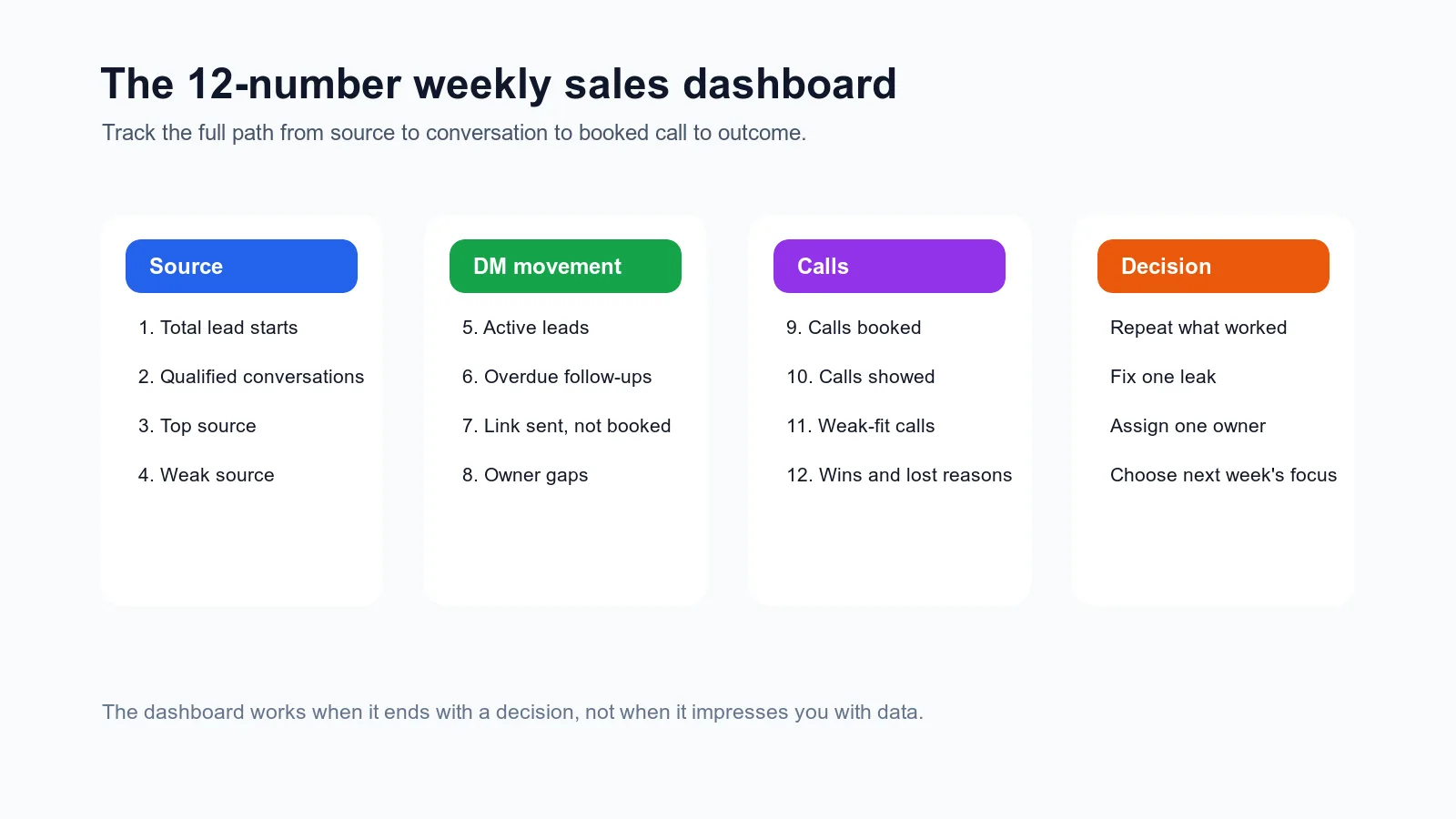
| Lane | Number | What it tells you |
|---|---|---|
| Source | 1. Total lead starts | How many people entered the sales path this week |
| Source | 2. Qualified conversations | How many lead starts became real sales conversations |
| Source | 3. Top source | Which source created the best conversations |
| Source | 4. Weak source | Which source created noise, no-shows, or weak-fit calls |
| DM movement | 5. Active leads | How many live conversations need movement |
| DM movement | 6. Overdue follow-ups | Where momentum is being lost |
| DM movement | 7. Link sent, not booked | Where booking handoff is leaking |
| DM movement | 8. Owner gaps | Which leads have no clear next-action owner |
| Calls | 9. Calls booked | How many leads reached the calendar |
| Calls | 10. Calls showed | Whether booked calls became real conversations |
| Calls | 11. Weak-fit calls | Whether qualification is too loose |
| Outcomes | 12. Wins and lost reasons | What happened and what pattern needs fixing |
This is enough.
You can build more later, but most coaches do not need a giant reporting system. They need a weekly truth about the sales motion.
Number 1: total lead starts
Lead starts are the people who entered a real sales path this week.
Not likes.
Not views.
Not general engagement.
A lead start means someone did something that could reasonably become a sales conversation:
- replied to a story with buying context
- sent a keyword
- clicked a DM ad
- asked about coaching
- replied to outbound
- came from a referral
- re-engaged after an old conversation
- filled out an application
This number tells you whether enough people are entering the top of the sales system.
But do not celebrate it by itself.
Lead starts can be high while quality is low.
That is why the next number matters more.
Number 2: qualified conversations
A qualified conversation is a lead start with enough real context to keep moving.
Examples:
- the person shared a specific problem
- the offer seems relevant
- there is a reason they are looking now
- they answered a useful qualification question
- they are not obviously a bad fit
- they are ready for a next step or continued qualification
This number keeps you from lying to yourself with volume.
If lead starts are high but qualified conversations are low, the issue may be:
- weak source quality
- vague CTAs
- low-intent keywords
- ads attracting curiosity instead of intent
- first replies not carrying context
- qualification questions that feel generic
That is where The Content-to-DM Handoff and Instagram DM Automation Examples can help. The bridge from attention to conversation is where a lot of "lead problems" are really handoff problems.
Number 3: top source
Your top source is not automatically the source with the most leads.
It is the source that created the best sales motion.
That might mean:
- most qualified conversations
- strongest booked calls
- highest show quality
- best-fit clients
- clearest buyer intent
- fewest handoff problems
For example, a DM ad might create 60 messages but only a few useful conversations. A story sequence might create 8 conversations, 5 strong calls, and 2 clients. The dashboard should make that difference visible.
This is why Lead Source Tracking for Online Coaches matters. If everything is labeled "Instagram," you cannot learn from the week.
Track source in at least two layers:
| Layer | Example |
|---|---|
| Channel | Organic Instagram |
| Source detail | Story reply |
| Trigger | Monday story about missed follow-up |
The more specific the source, the better your next content or ad decision gets.
Number 4: weak source
Weak sources are not always obvious.
Sometimes a source creates a lot of activity, which makes it feel valuable. But when you look closer, it produces:
- low-intent DMs
- poor qualification
- lots of price-only questions
- weak-fit calls
- no-shows
- people who need too much convincing
- leads who misunderstood the offer
The weak-source number keeps you from scaling noise.
Do not use it to shame a channel too quickly. Use it to ask better questions:
- Is the CTA too broad?
- Is the ad promise attracting the wrong people?
- Is the first reply disconnecting from the content?
- Is the source fine but the handoff weak?
- Are we qualifying too late?
Sometimes you do not pause the source.
You fix the bridge.
Number 5: active leads
Active leads are the live conversations that still need movement.
This includes:
- new leads waiting for first reply
- engaged leads waiting on qualification
- qualified leads waiting for booking decision
- leads who got the link but did not book
- booked calls waiting for notes
- post-call leads waiting on next step
This number tells you how heavy the sales system is right now.
If active leads keep rising but booked calls do not, you may have a middle-of-pipeline problem. The team is creating conversations, but not moving them cleanly.
That is often where coaches think they need more leads.
They may actually need better movement.
Number 6: overdue follow-ups
Overdue follow-ups are one of the clearest signs the system is overloaded.
Track:
- how many follow-ups are overdue
- which stage they are in
- who owns them
- why the follow-up exists
"Follow up" is too vague.
Better:
| Weak follow-up | Useful follow-up |
|---|---|
| "Check in" | "Ask if fixing setter handoff is still a priority before ads scale next month" |
| "Follow up Friday" | "Lead asked for link but did not book after saying mornings are hard" |
| "Circle back" | "Old lead said timing was bad until end of June" |
The reason matters because it changes the message.
This connects to the Online Coach CRM Fields Checklist. A follow-up date without a reason is just a reminder. A follow-up date with context is a sales asset.
Number 7: link sent, not booked
This number deserves its own line.
If booking links are sent but calls are not booked, something is happening between interest and commitment.
Possible causes:
- the link was sent too early
- the lead did not understand why the call mattered
- too many options created friction
- the handoff sounded casual instead of specific
- the lead was curious but not qualified
- the follow-up after link sent was weak
Do not automatically blame the lead.
Audit the message before and after the link.
The Booking Link Rule gives you a clean decision framework for this. Your dashboard should show whether that rule is being followed.
Number 8: owner gaps
An owner gap means nobody clearly owns the next move.
This happens constantly when coaches add VAs, setters, AI, CRMs, or automation without a clean operating model.
Examples:
- AI replied, but a human needed to review and nobody did
- setter thought the coach would answer the price question
- coach thought the setter would follow up
- VA tagged the lead but did not assign a next action
- closer took the call but did not update outcome
Owner gaps create quiet leaks.
They do not always show up as "missed leads." They show up as conversations that feel like they just stopped.
Track the number each week.
If it is more than a few, the system needs clearer ownership before it needs more volume.
Number 9: calls booked
Calls booked tells you how many leads reached the calendar.
Useful, but incomplete.
Booked calls can go up while sales quality goes down.
That happens when:
- the team books too early
- weak sources are scaled
- qualification standards loosen
- booking links are sent to anyone who sounds interested
- no-show risk is ignored
So yes, track calls booked.
Just do not let it become the only scoreboard.
If you have a setter, pair this with The Setter Scorecard. A good setter improves pipeline quality, not just calendar volume.
Number 10: calls showed
Calls showed tells you whether booked calls became real conversations.
If calls booked are strong but calls showed are weak, look upstream:
- was the call framed clearly?
- did the lead know what would happen?
- was there enough qualification before booking?
- was the call too far in the future?
- did reminders happen?
- did the lead have a real reason to protect the time?
This is exactly why Sales Call No-Shows for Online Coaches is not just a reminder problem. No-shows often start before the call is booked.
Your dashboard should make the pattern visible.
Number 11: weak-fit calls
Weak-fit calls are calls that technically happened but should probably not have been on the calendar.
Examples:
- the lead wanted something you do not offer
- budget mismatch was obvious before booking
- timing was not real
- they misunderstood the program
- the call was mostly education, not decision-making
- they were curious but not serious
This number protects your time and your team's morale.
If weak-fit calls rise, do not just coach the closer harder.
Look at:
- lead source
- first reply
- qualification questions
- booking-link timing
- setter rules
- ad promise
- handoff notes
Weak-fit calls are usually created before the call starts.
Number 12: wins and lost reasons
Wins matter, obviously.
But lost reasons matter too.
Track simple reasons:
- price
- timing
- not fit
- chose another option
- no response
- no-show
- needed nurture
- unclear
Do not make the list too complicated.
You are looking for patterns, not perfect psychology.
If "price" shows up repeatedly from one source, the issue may be expectation setting. If "timing" shows up after a specific content angle, the content may be attracting people who relate but are not ready. If "no response" appears after link sent, the booking handoff may be the leak.
Lost reasons turn frustration into feedback.
How to read the dashboard like a decision tree
The point is not to admire the numbers.
The point is to decide.
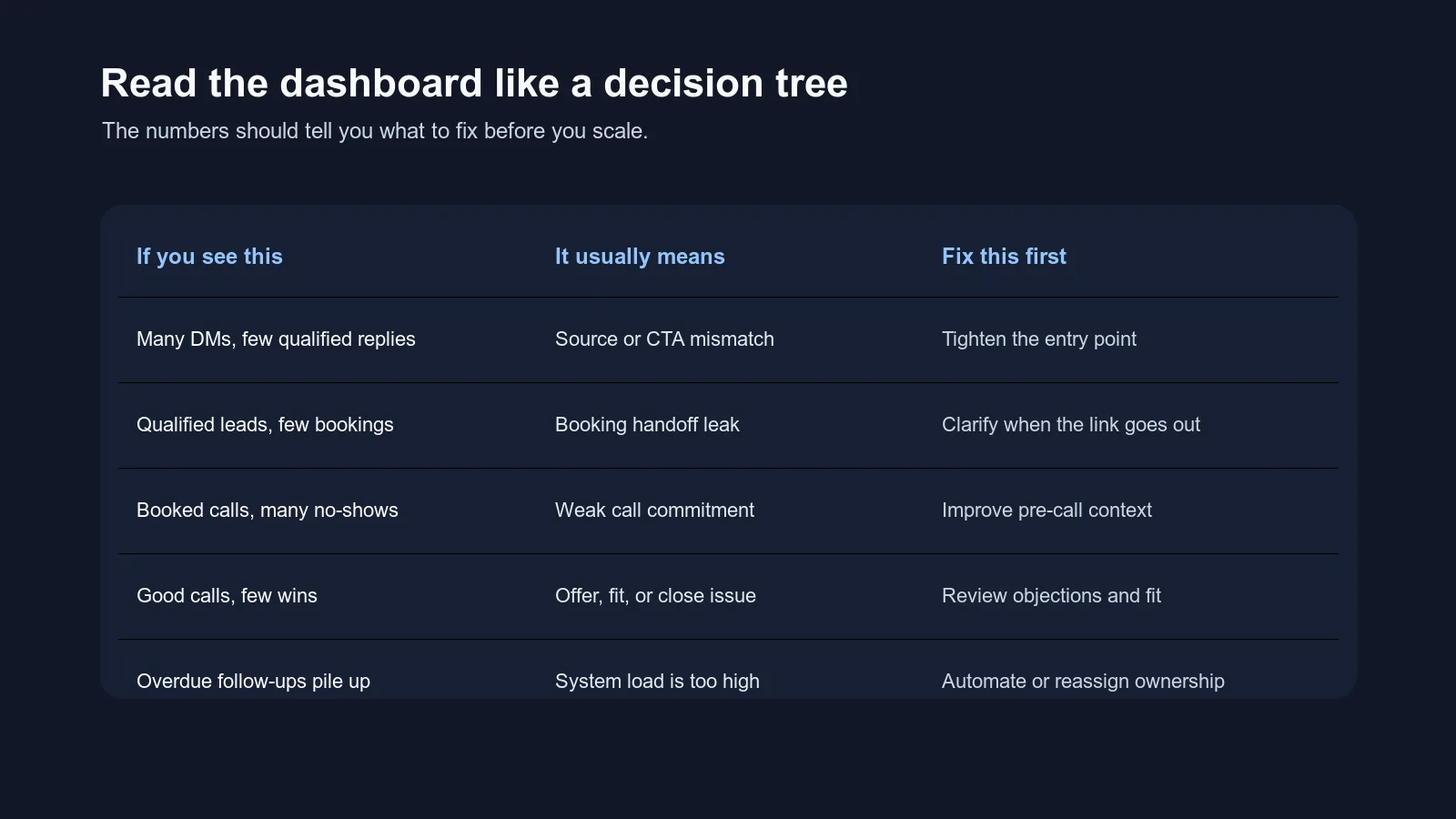
| If you see this | It usually means | Fix this first |
|---|---|---|
| Many DMs, few qualified conversations | Source or CTA mismatch | Tighten the entry point |
| Qualified conversations, few bookings | Booking handoff leak | Clarify when and how the link goes out |
| Booked calls, many no-shows | Weak call commitment | Improve pre-call context and reminders |
| Good calls, few wins | Offer, fit, or close issue | Review objections and qualification |
| Overdue follow-ups piling up | System load is too high | Automate, reassign, or simplify ownership |
| Many owner gaps | Roles are unclear | Define who owns each stage |
| Weak-fit calls increasing | Qualification is too loose | Tighten booking criteria |
| One source wins repeatedly | Clear market signal | Repeat that source intentionally |
This is the reason dashboards are useful.
Not because they make the business look sophisticated.
Because they stop you from fixing the wrong thing.
Where to pull the numbers from
You do not need one perfect tool on day one.
Pull from:
- Instagram insights and DM threads
- ad manager if you run DM ads
- CRM or lead tracker
- calendar tool
- call notes
- payment processor
- setter notes
- DM operating system
The important part is consistency.
If one person counts "qualified conversation" one way and another person counts it differently, the dashboard turns into debate.
Define the terms once.
For example:
| Term | Definition |
|---|---|
| Lead start | A person entered a sales path from content, ad, referral, outbound, keyword, or old thread |
| Qualified conversation | The lead shared enough context to justify continued qualification or booking |
| Link sent, not booked | Calendar link was sent but no call was booked within the review window |
| Weak-fit call | Call happened but the lead was clearly not a fit based on offer, timing, or expectations |
| Owner gap | A lead has no clear person or system responsible for the next action |
Definitions make dashboards useful.
Without definitions, everyone argues from memory.
The weekly review flow
Set aside 30 to 45 minutes.
Do this once a week.
1. Fill in the 12 numbers
Do not analyze yet.
Just fill them in.
Use the same definitions every week.
2. Compare to the last 2 to 4 weeks
You are looking for direction, not perfection.
Ask:
- what improved?
- what got heavier?
- what source is getting better?
- where is the same leak repeating?
- what changed after our last fix?
3. Pick one leak
Do not fix everything.
Choose one.
Examples:
- reduce overdue follow-ups
- tighten booking-link timing
- improve story-reply handoff
- add better call notes
- clarify owner rules for AI and setters
- pause one weak source
- repeat one strong source
4. Assign one owner
Every fix needs a person or system.
Not "we should."
Use:
- coach owns
- setter owns
- VA owns
- AI handles
- human review lane owns
5. Review again next week
The dashboard is only useful if it becomes a rhythm.
One good review is helpful.
Four weekly reviews create a pattern.
What not to track yet
Do not start with:
- every content metric
- every story view
- every follower change
- every profile visit
- every email click
- every possible attribution path
- a complicated lead score nobody understands
- a 20-stage pipeline
- a separate metric for every team member
Those might become useful later.
But if the sales system is messy, too many numbers will hide the obvious.
Start with the few that tell you where interest is leaking before revenue.
How this connects to AI and automation
A dashboard like this makes AI and automation safer.
Without it, you might automate the wrong thing.
You might add AI because DMs feel busy, when the real leak is call no-shows. You might hire a setter because follow-up feels heavy, when the real problem is weak source quality. You might scale ads because conversations are happening, when the dashboard shows most of them are not qualified.
The weekly sales dashboard tells you what class of problem you have:
- source problem
- qualification problem
- follow-up problem
- booking handoff problem
- call-quality problem
- ownership problem
- offer-fit problem
Then you can decide whether the fix is a script, a field, a rule, a person, automation, or a deeper system.
That is how you keep tools from becoming clutter.
Where Intellicoach fits
If your dashboard keeps showing the same pattern, pay attention.
Especially patterns like:
- overdue follow-ups keep piling up
- owner gaps keep appearing
- booking links are sent but not booked
- call notes are thin
- source context gets lost
- AI, setters, and humans are touching the same lead without one shared state
Those are not just reporting problems.
They are live-conversation system problems.
Intellicoach is built for coaches whose sales happen in DMs and who need the conversation, status, follow-up, source, and handoff context to stay together while volume grows.
For the broader system view, read What Is a DM Operating System?. For the field layer behind the dashboard, use the Online Coach CRM Fields Checklist.
The bottom line
The weekly sales dashboard should not make your business feel more complicated.
It should make the next fix obvious.
Track the 12 numbers. Read the pattern. Choose one leak. Assign one owner. Review again next week.
That rhythm is what separates "we are getting leads" from "we know how this sales system works."
Frequently asked questions
What should online coaches track in a weekly sales dashboard?
Online coaches should track lead starts, qualified conversations, top source, weak source, active leads, overdue follow-ups, booking links sent but not booked, owner gaps, calls booked, calls showed, weak-fit calls, wins, and lost reasons.
How often should coaches review sales metrics?
Coaches with real DM volume should review sales metrics weekly. A weekly review is frequent enough to catch stalled leads, source problems, no-show patterns, and handoff gaps before they become expensive.
What is the difference between a weekly CEO dashboard and a weekly sales dashboard?
A weekly CEO dashboard looks at the whole business, including content, sales, delivery, retention, and cash. A weekly sales dashboard is narrower. It focuses only on the path from lead source to DM conversation to booked call to sales outcome.
Do coaches need fancy analytics software for this dashboard?
No. A spreadsheet, CRM, or DM operating system can work as long as the fields are simple and reviewed weekly. The dashboard matters because it creates better decisions, not because it looks advanced.
Ready to Try Intellicoach?
Built for online coaches with real DM volume who want to automate follow-ups and qualification without losing their voice.