
Instagram DM Automation Examples: 9 Workflows Online Coaches Can Use Without Sounding Robotic
A practical library of Instagram DM automation examples for online coaches, including story replies, keyword flows, ad leads, follow-up, booking handoffs, and human review lanes.
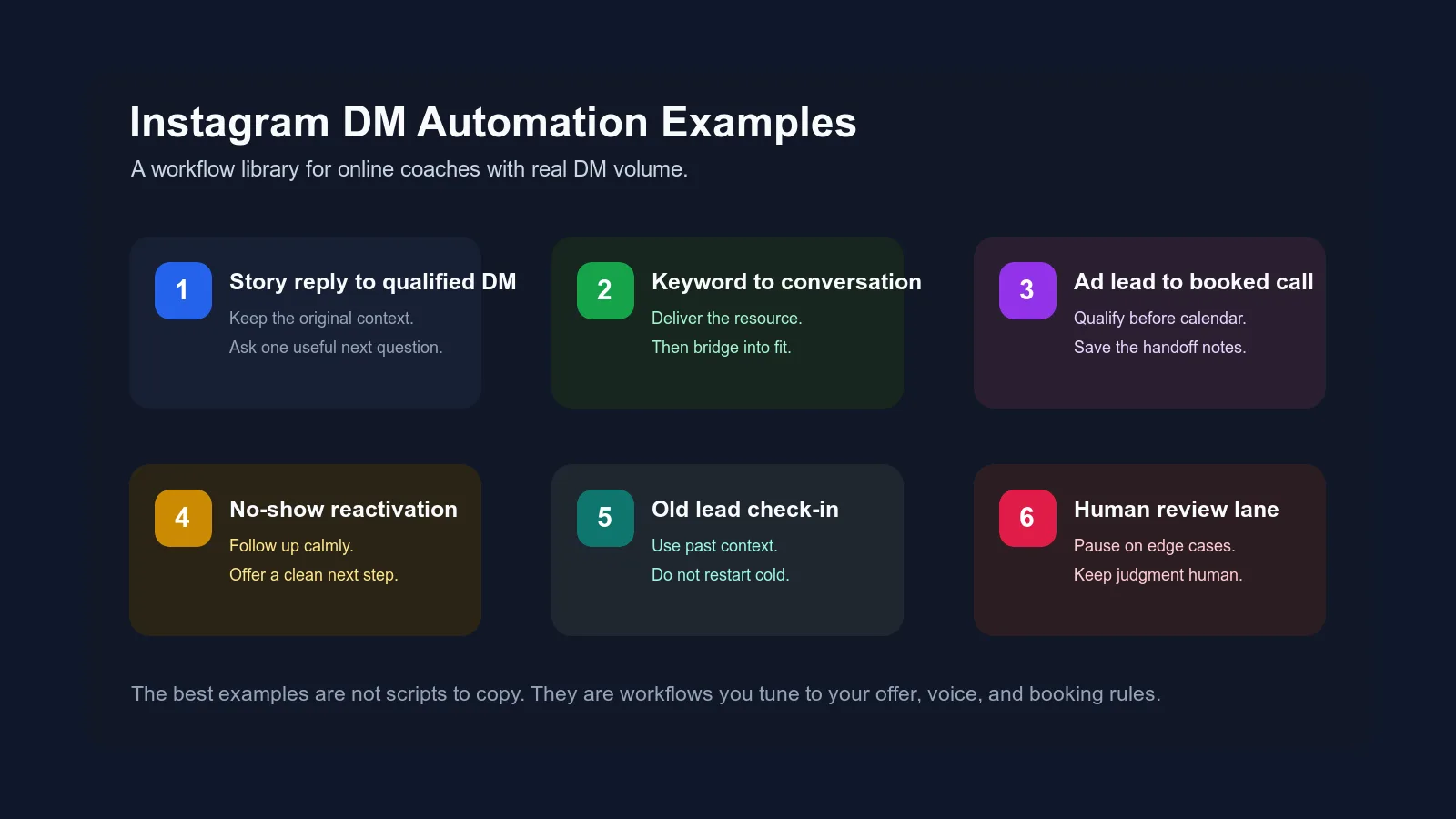
Most coaches do not need more random DM scripts.
They need better DM workflows.
A script tells you what to say once. A workflow tells you what should happen when a real person replies in a real Instagram conversation, disappears, asks about price, clicks an ad, books a call, no-shows, or comes back three weeks later.
That difference matters because Instagram DM automation gets weird fast when it is built around copy-paste messages. The lead can feel it. They replied to a specific story, ad, post, or offer, but the message back sounds like it came from a template that could belong to any coach on the internet.
This post is a workflow library. Use it to decide which Instagram DM automation examples actually fit your business, what each workflow should do, what AI can handle, and where human judgment still belongs.

First, do not build every automation at once
If your DMs are already busy, it is tempting to automate everything.
Story replies. Keywords. Lead magnets. Ad leads. Price questions. Objections. Follow-up. Booking links. No-shows. Old leads. Setter handoffs.
That is how teams create a big automation layer that nobody trusts.
Start with one leak.
Ask:
- Where are good leads getting stuck right now?
- Where does the team repeat the same work every day?
- Where does context disappear?
- Where are booking links being sent too early or too late?
- Where do conversations die even though the lead showed interest?
- Where does the coach still have to jump in manually?
Google's people-first content guidance says useful content should leave someone feeling like they learned enough to achieve their goal, not like they need to search again for the real answer. The same standard is useful for your DM automations: each workflow should solve a specific problem in the conversation, not exist because automation sounds impressive.
The goal is not to collect workflows.
The goal is to remove friction from the exact place your current DM system is leaking.
The anatomy of a useful DM automation workflow
Every good Instagram DM automation example has five parts.
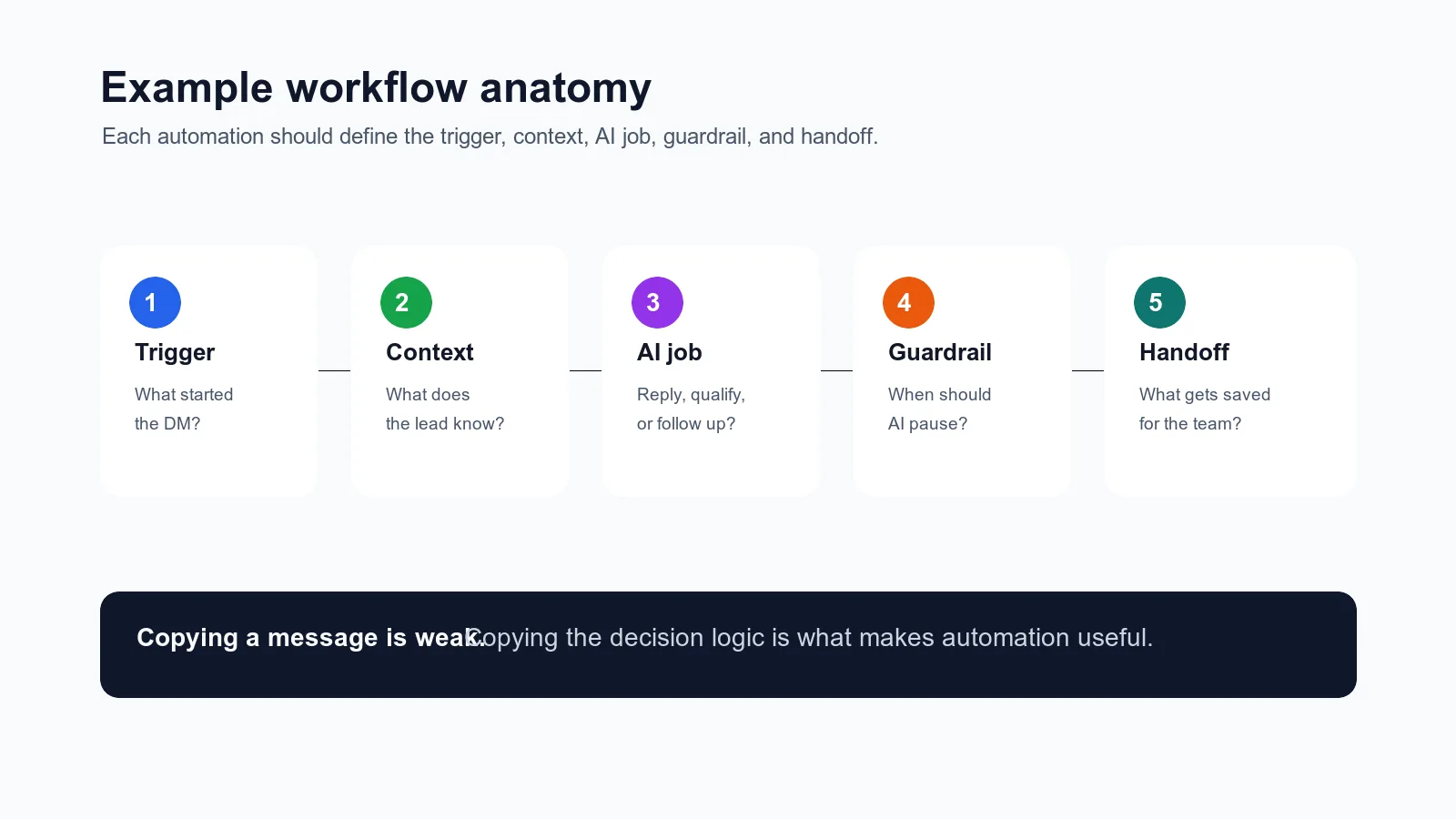
| Workflow part | Question to answer | Example |
|---|---|---|
| Trigger | What starts this workflow? | A story reply, keyword, DM ad, stage change, missed call, or old lead tag |
| Context | What should the system remember? | The post, story, resource, source, offer, previous reply, or stage |
| AI job | What should automation do? | Reply, qualify, follow up, summarize, route, or send the link |
| Guardrail | When should AI pause? | Price exceptions, sensitive objections, unclear fit, or missing context |
| Handoff | What should be saved for the team? | Source, goal, objection, booking status, next step, or call notes |
This is why copying someone else's message is usually weak.
The words are only the visible layer. The useful part is the logic underneath the words.
If you already read the broader Instagram DM setting guide, think of this post as the example library underneath that system. That guide explains the category. This one shows what to actually build.
Example 1: Story reply to qualified conversation
Use this when: people reply to stories, polls, or question boxes, but the conversation dies after the first exchange.
Story replies are warm because the lead reacted to a specific moment. The automation should preserve that moment.
Bad workflow:
| Step | Message |
|---|---|
| Lead replies to story | "I'm struggling with this" |
| Automation replies | "Hey! What are your fitness goals?" |
That reply is not evil. It is just contextless.
Better workflow:
| Step | What happens |
|---|---|
| Trigger | Lead replies to a story about the problem |
| Context saved | Story topic and reply text |
| AI job | Acknowledge the specific story and ask one next question |
| Guardrail | Do not pitch immediately |
| Handoff | Save the story topic as the lead source |
Example reply:
"Yeah, that pattern is frustrating. Is it mostly happening during the week when your schedule gets busy, or more on weekends?"
For a business coach, that might become:
"That is usually where the system starts showing cracks. Is the bigger issue lead follow-up, or the handoff from DMs to sales calls?"
The point is not the exact wording. The point is that the automation carries the story context into the first real question.
This connects directly to the content-to-DM handoff. Content creates the moment. The DM workflow has to keep it alive.
Example 2: Keyword to resource to qualification
Use this when: lead magnets get comments or keyword DMs, but the conversation turns into freebie delivery with no real next step.
Keyword automation is useful for simple entry points. Someone comments "PLAN" or DMs "AUDIT." The system sends the resource. Clean.
The leak happens after delivery.
Most coaches either stop there, or they pitch too quickly.
Better workflow:
| Step | What happens |
|---|---|
| Trigger | Lead sends keyword |
| Context saved | Keyword, post, resource requested |
| AI job | Deliver resource, then ask a relevance question |
| Guardrail | Do not ask for the call before the lead gives context |
| Handoff | Save keyword and answer |
Example:
"Here is the checklist. Quick question before you use it: are you trying to fix follow-up because leads are going cold, or because your team is missing who owns the next message?"
That question does two jobs.
It makes the resource feel useful, and it starts qualification without sounding like a trap.
If you are moving from keyword flows into AI, this is where ManyChat-to-AI migration matters. Keep the keyword trigger if it works. Move the nuanced conversation into AI.
Example 3: DM ad lead qualification
Use this when: paid ads create DM conversations, but too many calls are weak, unprepared, or not a fit.
Click-to-message ads can create volume quickly. That is the gift and the danger.
If automation sends the booking link too soon, the calendar may look full while call quality drops. If automation over-qualifies, the lead may lose momentum.
The workflow needs a middle path.
| Step | What happens |
|---|---|
| Trigger | Lead starts from a DM ad |
| Context saved | Ad campaign, promise, creative angle |
| AI job | Confirm what caught their attention and ask a fit question |
| Guardrail | Calendar link only after required context |
| Handoff | Save ad source, goal, bottleneck, and objection |
Example reply:
"Saw you came in from the coaching systems ad. Quick context so I do not send you the wrong thing: are you mainly trying to clean up lead follow-up, setter handoffs, or the way DMs turn into booked calls?"
For a health coach:
"Saw you came in from the meal planning ad. Before I point you anywhere, is the main issue not knowing what to eat, or knowing what to do but not staying consistent?"
The lead gets a relevant question, not a generic funnel greeting.
Meta's Instagram messaging platform documentation is also worth keeping bookmarked because Instagram automation sits inside platform capabilities and limitations. See Meta's Messenger Platform for Instagram features when you are checking what a tool can actually support.
Example 4: Price question to context
Use this when: leads ask "how much?" before they have shared enough to know whether the offer fits.
Price questions are not bad. They are often a sign of interest.
But many coaches mishandle them in one of two ways:
- dodge the question and sound evasive
- drop price without context and kill the conversation
The automation should be direct without losing qualification.
| Step | What happens |
|---|---|
| Trigger | Lead asks about price |
| Context saved | Stage, prior answers, offer interest |
| AI job | Answer according to approved rules, then ask one fit question |
| Guardrail | Escalate if price exceptions or payment promises are involved |
| Handoff | Save pricing concern or budget objection |
Example:
"Totally fair question. It depends on the option that fits, so I do not want to throw the wrong number at you. Are you looking for hands-on coaching now, or are you still comparing what kind of support makes sense?"
If your business has a fixed visible price, the reply can be more direct:
"The program starts at $X. Before I send details, the bigger question is fit. What are you trying to solve in the next 90 days?"
Do not invent pricing. Do not make guarantees. Do not let AI negotiate exceptions unless your rules explicitly allow it.
That is why AI DM guardrails should exist before price handling goes live.
Example 5: Follow-up after a qualified lead goes quiet
Use this when: leads answer a few useful questions, seem interested, then disappear.
Follow-up automation is one of the highest-leverage workflows, but it is also where bad automation feels the worst.
The problem is not following up.
The problem is following up without context.
Bad:
"Hey, just checking in!"
Better:
"Quick follow-up on what you said about leads going cold after the first reply. Is fixing that still a priority this month, or did it get pushed back?"
Workflow:
| Step | What happens |
|---|---|
| Trigger | Qualified lead inactive for defined time |
| Context saved | Last meaningful answer and current stage |
| AI job | Send a specific, calm follow-up |
| Guardrail | Stop if lead declines or asks not to continue |
| Handoff | Update stage after response |
The follow-up should not sound needy.
It should sound like someone who remembers the conversation.
If the exact message and send time are already known, Instagram's native scheduler may be enough. The guide to scheduling Instagram DMs explains when to use a scheduled message, when to set a reminder, and when the next action needs context-aware automation.
For deeper stage logic, pair this with the DM sales pipeline stages guide.
Example 6: Booking link after qualification
Use this when: your team is unsure when to send the calendar link.
This workflow is not about sending a link faster.
It is about sending it at the right moment.
| Step | What happens |
|---|---|
| Trigger | Lead meets booking criteria |
| Context saved | Goal, fit signal, timing, objection status |
| AI job | Send the booking link with a clear reason |
| Guardrail | Do not send if required context is missing |
| Handoff | Save summary for the call |
Example:
"Based on what you shared, it makes sense to talk through this properly. Here is the calendar link. Pick a time that works, and I will make sure the notes include that your main bottleneck is follow-up ownership after the first DM."
Notice the link is not thrown into the chat.
It is framed around the context already gathered.
If this is a problem in your business, read the booking link rule. It goes deeper on when to ask more and when to book.
Example 7: Booked-call handoff
Use this when: people book calls, but the coach, closer, or setter has to restart the conversation from scratch.
This is one of the most underrated automations.
The lead already booked. The automation's job is not to keep selling. It is to make the call better.
| Step | What happens |
|---|---|
| Trigger | Lead books a call |
| Context saved | Source, goals, objections, questions, timing |
| AI job | Summarize the DM thread for the sales team |
| Guardrail | Do not add assumptions not present in the thread |
| Handoff | Save the summary to the pipeline or call notes |
Good handoff notes include:
- source or trigger
- problem stated in the lead's words
- goal or desired outcome
- current bottleneck
- objections or concerns
- why they booked now
- anything sensitive the team should know
Weak handoff:
"Lead is interested in coaching."
Useful handoff:
"Came from the story about missed follow-up. Says leads are replying but the team loses track after the first conversation. Wants to fix handoff before scaling ads. Asked whether this works with a VA in the inbox."
That is the difference between a cold call and a warm call.
The DM lead handoff SLA covers this in more detail.
Example 8: No-show reactivation
Use this when: booked calls no-show or cancel and the follow-up is inconsistent.
No-shows happen.
The mistake is treating every no-show like rejection. Sometimes the person got busy, forgot, got nervous, or did not understand the value of the call.
The workflow should be calm and clean.
| Step | What happens |
|---|---|
| Trigger | Lead misses or cancels a call |
| Context saved | Original reason for booking and source |
| AI job | Follow up with one clear reschedule option or question |
| Guardrail | Do not guilt-trip or over-message |
| Handoff | Update status if they reschedule, decline, or stay inactive |
Example:
"Looks like today got away from us. Based on what you shared about wanting to clean up your DM follow-up, do you still want to talk through that this week, or should I close the loop for now?"
This gives the lead dignity and gives your team clarity.
For a fuller breakdown, read sales call no-shows for online coaches.
Example 9: Old lead reactivation
Use this when: you have past conversations, old applications, old no-shows, or leads who were not ready before.
Old lead reactivation should not feel like a random blast.
It should use context.
| Step | What happens |
|---|---|
| Trigger | Old lead tag, stage, or time window |
| Context saved | Last known goal, objection, offer interest |
| AI job | Send a relevant check-in |
| Guardrail | Do not pretend the conversation is fresh if it is not |
| Handoff | Update source and reactivation status |
Example:
"You mentioned a while back that the main issue was staying consistent once work got busy. Is that still the thing you are trying to fix, or has the bottleneck changed?"
For a coaching business systems lead:
"Last time we talked, the big issue was DM follow-up falling between you and your setter. Did you end up solving that, or is it still creating drag?"
This is not magic. It is just respectful context.
Old leads often remember the original conversation. Your automation should too.
Which example should you build first?
Use this decision table.
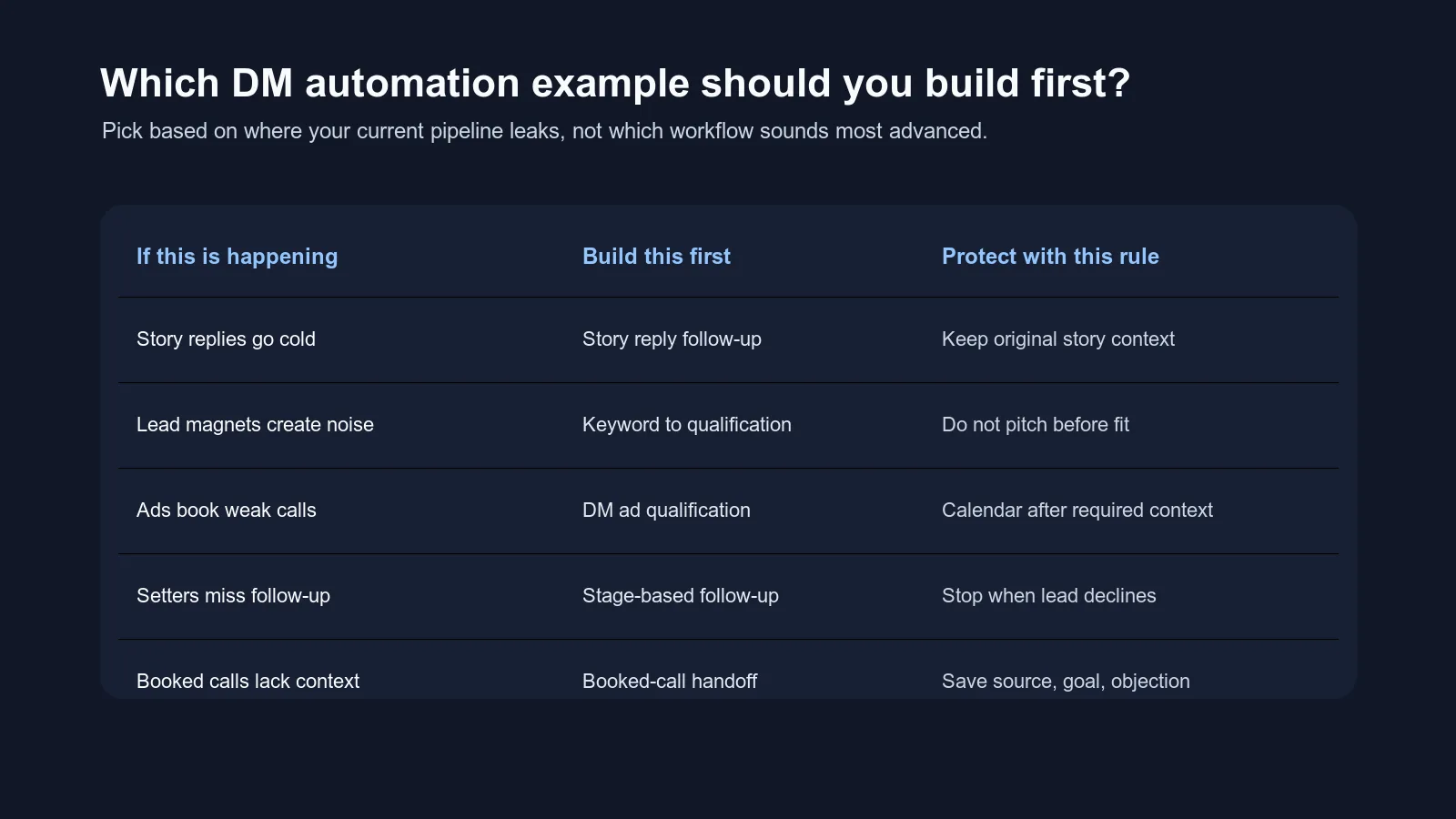
| Current leak | Build this first | Why |
|---|---|---|
| Story replies go cold | Story reply to qualified conversation | Keeps warm context from disappearing |
| Keywords create freebie collectors | Keyword to resource to qualification | Bridges resource delivery into real fit |
| DM ads book weak calls | DM ad lead qualification | Protects call quality before calendar links |
| Price questions stall | Price question to context | Keeps price direct without losing qualification |
| Good leads disappear | Stage-based follow-up | Reopens real conversations without generic nudges |
| Booking link timing is messy | Booking after qualification | Gives the team a shared send-link rule |
| Calls start cold | Booked-call handoff | Gives the closer the story before the call |
| No-shows are unmanaged | No-show reactivation | Recovers real interest without pressure |
| Old leads sit untouched | Old lead reactivation | Uses past context instead of starting over |
If you are unsure, start with the workflow closest to revenue.
For most coaches with volume, that is usually booked-call handoff, booking link timing, or follow-up after qualification. Those do not require more lead flow. They make the current flow less leaky.
The message examples are not the system
This is worth saying plainly.
The example messages above are not meant to become your permanent scripts.
They are patterns.
Your version should change based on:
- your voice
- your offer
- your niche
- your qualification rules
- your call booking process
- your team structure
- what the lead already said
- whether the lead came from content, ads, referral, outbound, or reactivation
If every lead gets the same message, you have not built a strong automation system. You have built a template machine.
That is what makes DMs feel robotic.
The better approach is to teach the system how to decide:
- what context matters
- what one question comes next
- when the lead is ready for booking
- when AI should pause
- what the human needs to know
That is why the AI setter onboarding checklist is a useful companion. It helps you feed the system your offer, voice, qualification rules, and escalation standards before AI starts replying to real leads.
A simple build order for the next 30 days
If you want to implement this without turning your inbox into a science project, use a four-week build order.
Week 1: Pick one source
Choose one source only:
- story replies
- one keyword
- one ad campaign
- old booked calls
- no-shows
- qualified leads stuck before booking
Do not automate every source at once.
Week 2: Write the workflow logic
For that one source, define:
- trigger
- context to preserve
- first reply
- one qualification question
- booking rule
- escalation rule
- handoff summary
- stop rule
This is the part most teams skip.
They write the message before they write the logic. Reverse that.
Week 3: Test with real old threads
Pull a few archived conversations from that source.
Ask:
- would this workflow know why the person replied?
- would the first message feel relevant?
- would it ask too much at once?
- would it send the link too early?
- would it pause on the right edge cases?
- would the handoff help the sales call?
Do not use fake perfect examples only. Use messy real threads.
Week 4: Launch small and review
Turn on the workflow for one lane.
Then review:
- where replies sounded generic
- where leads answered better than before
- where the system got stuck
- where a human had to step in
- where the booking rule was too loose or too strict
- where handoff notes were useful or thin
This is also where Google's people-first principle applies to your site content and your sales automation: helpful systems satisfy the real person on the other side. If the reader or lead feels like they were pushed through a generic path, you have more tuning to do.
Final filter: would this feel useful if you received it?
Before any Instagram DM automation workflow goes live, read the message from the lead's side.
Ask:
- Does this remember why I replied?
- Does this ask one clear question?
- Does this sound like the coach or brand?
- Does this make the next step obvious?
- Does this avoid fake urgency?
- Does this avoid pretending to know things it does not know?
- Does this give me room to say no?
- Does this move the conversation forward?
If the answer is yes, you probably have a useful workflow.
If the answer is no, do not blame automation yet.
Fix the workflow.
The bottom line
Instagram DM automation examples are only useful when they help you build better decision logic.
Do not copy these messages word for word and expect them to work. Use them to identify the workflow your business actually needs, then tune the trigger, context, AI job, guardrail, and handoff around your offer and voice.
For online coaches with real DM volume, the best automation does not make conversations feel less human.
It makes the human parts easier to protect.
Frequently asked questions
What are good Instagram DM automation examples for online coaches?
Good examples include story reply follow-up, keyword-to-resource delivery, lead magnet qualification, DM ad qualification, booked-call handoff, no-show reactivation, old lead check-ins, objection review lanes, and weekly conversation quality reviews.
Should coaches copy DM automation scripts word for word?
No. Coaches should copy the workflow logic, not the exact words. The best DM automation examples define the trigger, context, next question, booking rule, escalation rule, and handoff, then adapt the language to the coach's voice and offer.
How do I make Instagram DM automation sound less robotic?
Keep the original conversation context, ask one question at a time, use real voice examples, avoid generic hype language, define when AI should pause, and review live conversations every week.
Which Instagram DM automation workflow should I build first?
Build the workflow that fixes your biggest current leak. If story replies go cold, build story reply follow-up. If ad leads book weak calls, build qualification before booking. If sales calls start cold, build booked-call handoff context.
Ready to Try Intellicoach?
Built for online coaches with real DM volume who want to automate follow-ups and qualification without losing their voice.